GDPR supervisory authorities (SAs) emphasise data protection training (e.g. the UK Information Commissioner's personal data breach notification form asks, "Had the staff member involved in this breach received data protection training in the last two years?", and "Please describe the data protection training you provide, including an outline of training content and frequency").
What about security? Security of personal data is of course important under GDPR, and organisations can be fined for not having appropriate security measures in place. While security training for developers is not specifically mentioned in GDPR as such, developers do also need training on application security issues
that can lead to breaches of websites, online services and any databases or
other data storage behind them (including personal data in systems). Most IT
staff, developers and otherwise, are not necessarily cyber security (or even security) experts, and
must be educated on what to look for and how to address, at least, the most
common key security issues.
Many online training courses on cybersecurity
for developers are now available. There are also "cyber ranges" offering
users deliberately vulnerable systems, websites or online applications that
users can attack and seek to exploit, to learn how hackers think and the kinds
of the actions they take, and therefore be able to defend against them better.
This blog reviews the Shred range, then
the online training courses. These cover some of the issues referenced in the
recently-finalised European Data Protection Board (EDPB) Guidelines
01/2021 on Examples regarding Personal Data Breach Notification, as those
Guidelines include some recommended security measures as well as breach
notification, and also mention OWASP for secure web application development.
Cmd+Ctrl Ranges and Shred
Cmd+Ctrl's ranges are generally available
only to paying organisations to train their staff (but not to paying
individuals, sadly. Missed trick there, as I think individuals wanting to
improve their ethical hacking skills would pay a reasonable fee or sub for access).
People who signed up for the event were however given free access to Shred for
a month. Shred is meant to be one of the easy ranges.
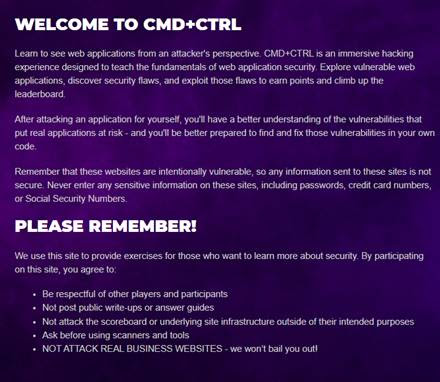
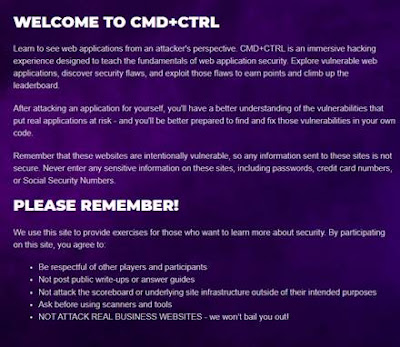
The Cmd+Ctrl login page provides some sensible
disclaimers and warnings:
After logging in, you need to click on the
relevant range's name and wait a few minutes for it to start up (each user gets
their own virtual machines I suspect on Amazon Web Services), as a real website
available on the Internet with its own URL (hence the exhortation not to enter
sensitive information on the website - I would expand that to real names, real
email addresses and basically any real personal data, because real hackers can
also access that website as much as you can!).
Then, basically explore the website and try
different things to find vulnerabilities e.g. click the links, register user
accounts, try different URLs, enter different things into the search or login
forms, etc. I won't share screenshots of Shred so as not to give anything away,
but it emulates an online shop for skateboards and related accessories and
pages, with user accounts that can store user details including payment cards,
the ability to purchase gift cards, etc. Each machine is up for I believe 48
hours, and each time you start it, it may have a different URL and IP address. If
things go badly wrong you may have to reset the database (which loses your
changes e.g. a fake user you registered) or even do a full reset, but you're
not penalised for that, the system retains the record of scores you achieved
for previous exploits.
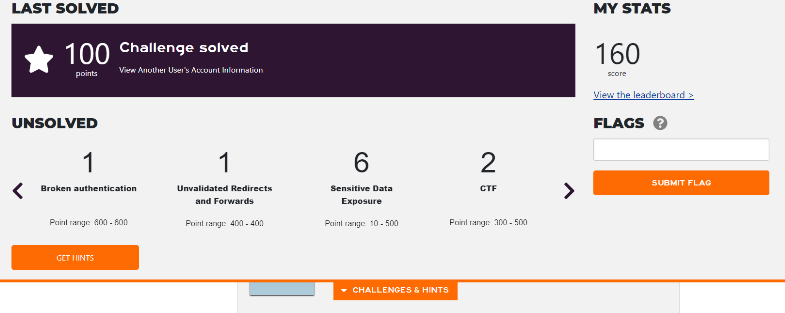
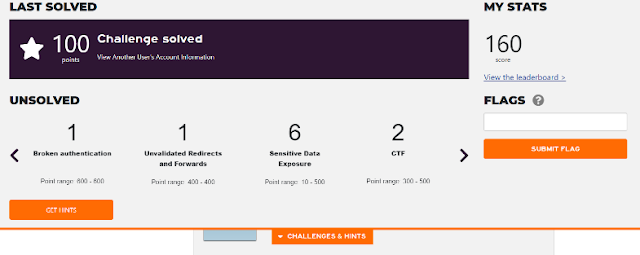
When you successfully exploit a
vulnerability, a banner slides in from the top of the webpage indicating what
challenge was solved and how many points you gained for it. You can also see what
broad types of other challenges remain unsolved.
Via the My Stats link, you can see a Challenges
page, which also gives similar broad information about the types of challenges
remaining unsolved. Unfortunately, only Category information was provided regarding
unsolved challenges (see the Category column of the Solved table shown below
for examples).
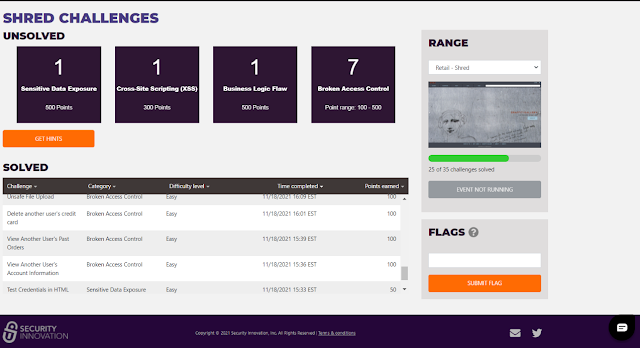
No
detailed information about the exact nature of any challenge (i.e. the info
under the Challenge column, such as "Unsafe File Upload" in the table
above) was provided. It appeared only after you actually solved the challenge, whereupon
it was listed in the Solved table (as well as the banner appearing). The
"Get Hints" link was disabled for this event - but presumably hints
are available in the paid versions of the ranges. However, Security Innovation
provided a live online introduction on the first day of the CTF event, access
to a one-page basic cheat sheet tutorial, with a guide to Burp Proxy for
intercepting HTTP traffic, and weekly emails with some hints and links to
helpful videos. A chat icon at the bottom right of every webpage allowed the
user to ask questions of support staff. I tried to confine my range attempts to
the afternoon/evening given that Cmd+Ctrl is US-based, but I was very impressed
with how quickly responses were given to my chat queries, even though I was
using the range as an unpaid user. The support staff did not give away any
answers, but instead provided some hints, often very cryptic - I suspect similar
to the tips that users for whom the Get Hints" link is enabled would
receive.
Under My Stats there was also a Report Card
link giving detailed information about your performance, also in comparison to
others who had attempted the range, including the maximum score reached.
Challenges were again shown here, broken down by category and percentage
solved.
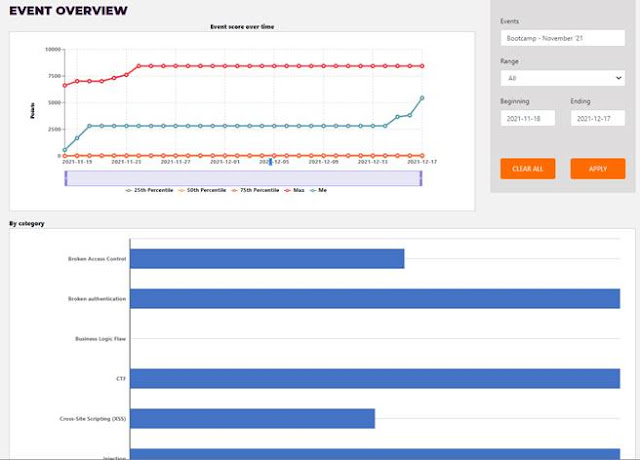
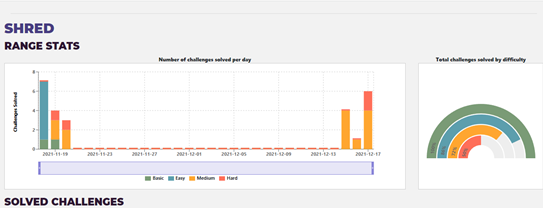
As well as repeating the solved challenges
table further down on this page, there's also a time-based view of the user's stats.
As you'll see, I had a go over the first weekend, solving a few basic and easy
challenges, then left it until I realised that I would lose access to Shred
soon, so I made a concerted effort over the last few days though I ran out of
energy with an hour or two to spare!
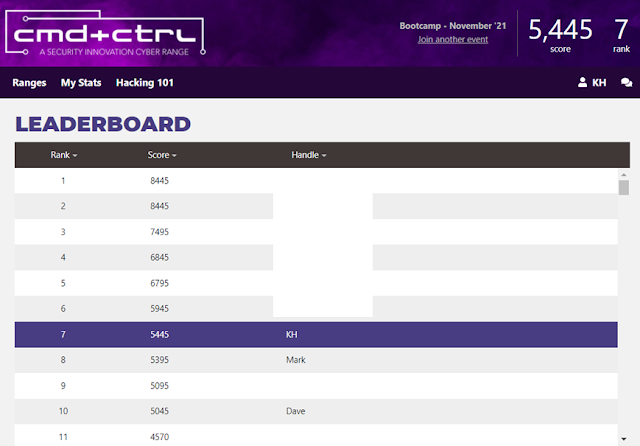
I was rather chuffed that, as a mere lawyer
and not cybersecurity professional, I managed to complete 25 out of the 35
challenges and reach the rank of 7, out of 54 people who at least attempted
Shred (in the screenshots below I've redacted names and handles other than
common ones like Mark or David). I admit I have attended some pen testing
training, one excellent 2-day course with renowned web security expert Troy Hunt (yes, I was very
lucky), and one terrible week-long course with someone whose name should never
be mentioned again (but at least the food was great). However, those courses were several years ago, and this is the first time that I've
attempted a range or CTF event. (I've signed up for other services with some similarities,
Hack the Box and RangeForce
Community Edition, but I haven't had time to try them properly yet.)

Prerequisites for trying these ranges
You do
need some prior knowledge, particularly about HTML and how URLs, query
parameters and web forms work, HTTP, cookies, databases and SQL etc, and
concepts like base64 encoding and hashes. You also have to know how to use tools
like Chrome developer tools, which is built into Chrome, to edit Shred webpages'
HTML. I'd not used those developer tools before tackling Shred, but searched
for how (I didn't resort to Burp for Shred, myself). I probably have a better
foundation than most tech lawyers as I have computing science degrees as well
as the pen testing training, coupled with a deep and abiding interest in
computing and security since my childhood days. So I'd strongly recommend that
those without such a foundation should take the courses before attempting any
ranges (the courses are covered in more detail below).
Positives
The range provided an excellent
assortment of different vulnerabilities to try to exploit, most of the type
that exist in real life (indeed, recently I spotted a common one on one site I
shop from, when I mistyped my order number into its order tracking form!). The
chat support staff were very prompt, although I couldn't figure out some of
their hints.
Negatives
Shred included 3 challenges
(maybe more?) that involved the solving of certain puzzles (at least one of
which scored quite a few points). However, I think the range would have been
better if they had not been included, as you wouldn't find them on actual websites
- they were simply puzzles to solve, not realistic website vulnerabilities. OK
perhaps for some fun factor, not so much for learning about web
vulnerabilities, particularly as access to the range is time-limited.
The biggest negative in my view is that no
model answers are given at the end. If you haven't managed to solve some of the
challenges, tough luck, they won't tell you how. A support person said they
felt that these ranges could be devalued by "giving away too much",
because customers pay to access its ranges. However, I think that view is
misconceived.
It depends on how customers use these
ranges internally. I believe they would be best used as hands-on training for tech
staff (developers, security), but I can't see why previous users would give
away the answers to colleagues or indeed people in other organisations, as it
defeats the object of trying these ranges. If organisations required staff to
achieve a minimum score on these ranges, then yes, that might incentivise
"cheating" and disclosure of solutions. But it's not uncommon, and in
fact often a good thing, to form teams to solve challenges together and share
knowledge. For this and many other reasons, such a requirement would not make
sense. And it would make no sense for one customer of Security Innovation to
give the answers away to other customers, what would be the purpose of that?
Conversely, it would be very frustrating
for someone who had paid to use the range to find out that they would not be
told any outstanding answers at the end. If you haven't managed to teach
yourself the solutions, you don't know what you don't know, how will you learn
if they refuse to fill in the gaps? Security Innovation already impose a
condition on the login page that users cannot post public write-ups or answer
guides, which they could expand if they wish (though I don't think that's
necessary or desirable).
In similar vein, I think they should at
least give hints about the detailed challenges (e.g. "Unsafe file
upload" as one challenge), not just categories of challenges. The cheat
sheet mentioned a few types of vulnerabilities that I spent too many hours trying
to find, and it was only on the last day or two before expiry that I asked on
the chat, only to be told Shred didn't actually have those types of
vulnerabilities! I appreciate Cmd+Ctrl doesn't want to give too much away, but
knowing there's an unsafe file upload issue to try to exploit still doesn't
tell you how to exploit it, and it would have saved me so much time
particularly given that access to Shred was time-limited. Again, I think paying
customers would appreciate more detailed hints so that they can be more
targeted and productive in tackling the challenges during the limited time
available (and perhaps "Get hints" would have done that, but access
was disabled for this event).
Also, I'm not sure how time-limited access
would be for the paid version, but organisations wanting to subscribe should of
course check the details and ensure the time period is sufficient for their
purposes, as staff also have to do their jobs! (I tried the range during my
annual leave).
Final comments
I think it's definitely worth
it for organisations to pay for their developers to try these ranges, subject
to the negatives mentioned above (and see below for my review of the training
courses). These ranges can be more interesting and fun for users, and certainly
involve more active learning (looking into various issues in context as part of
attempting to exploit those types of vulnerabilities), which research has shown
improves understanding, absorption and retention. And of course, gamification
is known to increase engagement. Attempting these ranges would help to
consolidate knowledge gained during the security training.
But, as mentioned above, I believe the best
way would be to give staff enough time to tackle the ranges, over a reasonable
period over which the relevant range is open. Don't make staff do this exercise
during their weekends or leave, or require each person to reach a minimum
score; instead, hold a debrief at the end of the period, for staff to discuss
the exercise and share their thoughts (and hopefully receive the answers to
challenges none of them could solve, so that they can learn what they didn't
know). I appreciate that leaderboards and rankings can bring out the
competitive streak and make some people try harder, but I believe team members
need to cooperate with each other, and staff shouldn't be appraised based on
their leaderboard ranking (or be required to reach a minimum score) - the joint
debrief and "howto" at the end is, I feel, the most critical aspect to
getting developer teams to work together better in future to reduce or
hopefully eliminate vulnerabilities in their online applications.
Cmd+Ctrl offers a
good variety of ranges with the stats and other features covered above,
which seem very up to date in their scope: banking (two), HR portal, social
media, mobile/IoT (Android fitness tracker), cryptocurrency exchange, products
marketplace, and cloud. I wish I'd had the chance to try the cloud ones! In
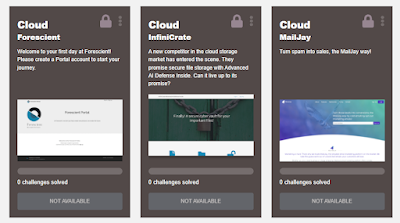
fact, there now seem to be 3 separate cloud-focused ranges: cloud
infrastructure, cloud file storage, and what seems to be a cloud mailing list
management app, i.e. both IaaS and SaaS.
Wishlist
A range that actually allows the
user to edit the application code to try to address each vulnerability, then
test again for the vulnerability, would be great for developers!
Online training courses
Alongside access to Shred, for those who
signed up to the Nov 2021 bootcamp, Security Innovation kindly offered access
for 6 weeks to 32 online courses from its full catalog of training
courses. I provide some comments on format and functionality first, then end
with thoughts on the content.
I took the bootcamp courses, but the vast
majority of them only after I'd finished the Shred range. The information in
some of those courses would help with the Shred challenges, but not all of
them, and they are aimed at developers, so to follow those courses you would
also still need some prior computing and coding knowledge.
It was great that many courses were based
on the Mitre CWE (common weakness enumeration)
classifications often used in the security industry, e.g. incorrect
authorization (CWE-863) and on the OWASP 2017 top 10
security risks, but I won't list them all here. The topics covered by the
bootcamp: fundamentals of application security, secure software development,
fundamentals of security testing, testing for execution with unnecessary
privileges, testing for incorrect authorization, broken access control, broken
authentication, database security fundamentals, testing for injection vulnerabilities,
injection and SQL injection, testing for reliance on untrusted inputs in a
security decision, testing for open redirect, security misconfiguration, cross
site scripting (XSS), essential session management security, sensitive data
exposure (e.g. encrypting), deserialization, use of components with known
vulnerabilities, logging and monitoring and XML external entities.
Several courses were split logically into
one course on the problem, and the next on mitigating it, or testing for it.
Personally, I learn best by being told the point, then seeing practical concrete
worked examples, and I would have liked to see more concrete examples of e.g.
XSS attacks or SQL injection attacks. A couple were given occasionally, but not
enough in my view. (I appreciate some examples can be found by searching
online.)
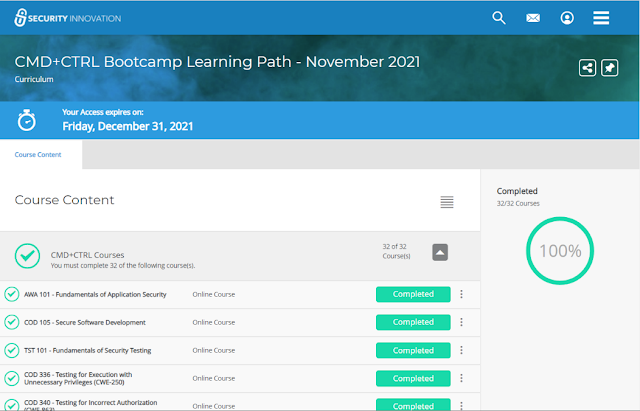
The above shows Completed but a course's status
could also be displayed as being in progress. You need to click against a
particular course (where it shows Completed above) to enrol in the first place,
an extra step whose purpose I couldn't fathom (why not just
"Start"?). The 3 dots "action menu" enables you to copy the
direct link to a particular course for sharing, or pin individual courses.
Clicking on a course name takes you to a
launch page, from where you can also open a PDF of the text transcription of
the audio.
You can leave a course part-completed, and
resume later:

When you launch or resume a course, a video
appears for playing. There are 3 icons on the top right, above the video, for a
glossary (the book), help regarding how to use the video (the questionmark),
and the text version of the course (printer icon).
Positives
This course caters for people
with different learning styles, by providing both videos and PDF transcriptions.
Personally, I scan text a zillion times faster than if I had to watch a video linearly at the slower pace at which people speak, so for learning I much prefer text over
video (plus the ability to ask questions, but I didn't see a chat icon - I
don't know if that's possible with the paid version?). So, I always clicked the
printer icon to read the PDF (opens in another tab) rather than watch the
video.
A TOC button on the bottom right brings up a table of contents on the left, where you can click to go straight to a particular section of the video. That it also shows progress, with a tick against the sections that you've watched.
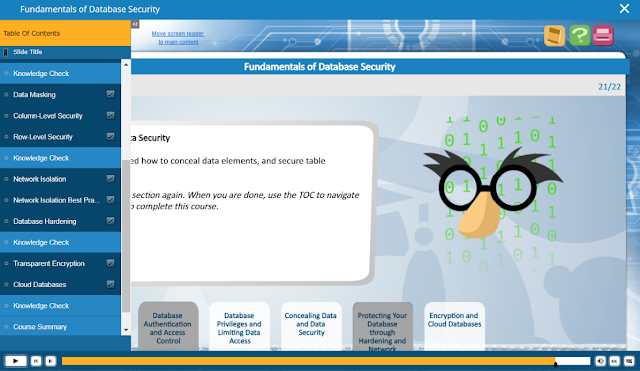
Another positive, from an accessibility perspective: the CC (closed captions) button at the bottom right brings up the text transcript for the current part of the video, synchronised to the audio.

Negatives
The PDF didn't always show all
the slides from the video, especially in the first few courses - not all the
slides contained substantive content, but some slides with example URLs or code
were missing from the PDF version. So, personally, I only played the videos to
check for any useful slides missing from the PDFs.
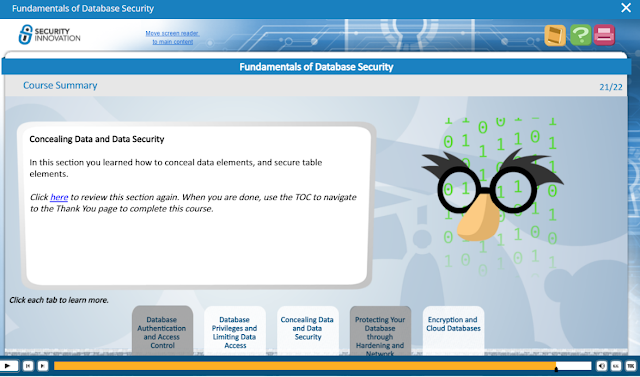
If you play a video, it stops occasionally
and you have to click the play button again to start the next section, which
may not be obvious. Sometimes it stops to provide interactivity, i.e. the user
has to click on one part of the slide to learn about that issue, click on
another part to learn about another issue etc. I hate these types of features,
myself. I would prefer videos to just play continuously, moving on from section
and part to section and part, unless and until the user pauses it. Stopping a
video to force the user to click on something just to get to the next portion
seems popular, particularly with the periodic online staff training that many
are compelled to undergo for regulatory compliance reasons, but really it's not
the same as active learning, in my view! Forced stops like these just break the
train of thought and get in the way, when the user wants to get a move on. But
perhaps this is a matter of personal preference, so allow me my rant about
"interactive" online training courses!
Exam
At the end of a video, you can take an exam
(and there are also Knowledge Check quizzes to answer throughout the video). As
I had scanned the PDFs rather than watch the videos, I generally went straight
to the exam via the TOC or by dragging the position arrow.
If you pass an exam, you get a certificate of
completion that you can download under the Transcripts section of the site,
which also allows printing of the list of courses and marks (niggle: all
certificate PDFs had the same filename, it would be great if certificate
filenames followed the course name, and if you could download a single zipped
file of all certificates in one go).
You're allowed to take the exam multiple
times until you pass. Most exams comprise about 4-5 questions, although one had
3, a few 6-8, and another 12 questions. They estimate it takes about 5 mins per
exam (10 mins sometimes), which I found was about right.
It doesn't seem possible to go back and
amend your answer if you change your mind about a previous question - when I
tried that to do that in one exam, it threw a fit and I ended up having to
retake the exam (with the same answers) twice before it would register as
completed.

At the end of the exam, your full results
are shown (it doesn't show results per question as you go through):

Tips
The obvious answer is usually the
right one, and if you think "Yes, but only if..", then the answer is
probably "No"! I felt a few of the questions or multiple choice
answers were unclearly or ambiguously phrased. I did think some of the answers
were more about categorising vulnerabilities by type, e.g. broken
authentication, or more about vulnerabilities than about how to mitigate them.
If you didn't pass, you can click Review
Exam to see where you went wrong, which is helpful. I only had to retake one to
pass (becase of the No answer above when I had answered Yes!), but didn't
bother to retake a few others where I'd passed with less than 100%.
I discovered that I actually knew more than
I thought I did, so the courses didn't actually help me with Shred (although
the support staff tips did). But I still learned some useful things that I
didn't already know, and I strongly recommend that those without the necessary foundation
should take these courses before trying the ranges.
Final thoughts
Overall, I would recommend the Cmd+Ctrl
ranges as an excellent way for developers and security staff to learn about
online application vulnerabilities, subject to taking the courses first for those
without the prior knowledge. They really are aimed at developers/programmers,
so most lawyers may struggle, even tech lawyers. I do think it's helpful for
lawyers to have a basic knowledge of the common vulnerabilities and how they
are exploited and mitigated when discussing cybersecurity measures and breaches
with clients that have suffered incidents, but you probably don't need to
tackle the courses or ranges to gain that knowledge.
Thanks very much again to SecurityInnovation for making Shred and the courses available for the OWASP London CTF
2021 event!
(I wrote this back in Dec 2021 but for various reasons couldn't publish it till now.)